Document Trust Seal API
v1.0Stamp PDF documents with a cryptographic seal. Detect tampering instantly.
Overview
Invoice fraud is a real problem. A fraudster intercepts a PDF in transit, changes the bank account number, and forwards it on. The Document Trust Seal API stops this by locking the document with a SHA-256 fingerprint at the moment it leaves your hands.
Anyone receiving the document can verify it in seconds. If a single byte has changed, the seal fails. The original document is never stored — only its hash and minimal metadata are retained.
🔒 Tamper Proof
SHA-256 fingerprint detects any change to the document after sealing
🛡️ Visual Badge
Professional Verified & Secured stamp added directly to the PDF
🔍 QR Trust Page
Premium seals embed a QR code linking to a hosted verification page
💡 Perfect For
- • Finance teams sending high-value invoices
- • Freelancers and agencies targeted by payment redirection fraud
- • Accounts payable automation platforms
- • Legal and compliance document workflows
- • Any business that needs proof of document authenticity
Quick Start
Base URL
https://api.cparse.com/seal/v1Authentication
X-API-Key: YOUR_API_KEYGet your API key from the dashboard. New accounts include free credit — no credit card required.
Seal a Document
cURL — Standard Seal
curl --request POST \
  --url https://api.cparse.com/seal/v1/seal \
  --header 'X-API-Key: YOUR_API_KEY' \
  --form 'file=@invoice.pdf' \
  --form 'tier=standard' \
  --output sealed_invoice.pdf
Premium Seal with QR Code
cURL — Premium Seal
curl --request POST \
  --url https://api.cparse.com/seal/v1/seal \
  --header 'X-API-Key: YOUR_API_KEY' \
  --form 'file=@invoice.pdf' \
  --form 'tier=premium' \
  --form 'issuer_name=Acme Corp Ltd' \
  --output sealed_invoice.pdf
The seal ID is returned in the X-Seal-ID response header.
Endpoints
/sealStamp a PDF with a Verified & Secured badge and create a cryptographic seal.
Request (multipart/form-data)
file(required) — PDF document to sealtier(optional, default: standard) —standardorpremiumissuer_name(optional) — Label shown in the badge and on the Trust Page (e.g. your company name)
Response
Returns the sealed PDF as application/pdf. The seal ID is in the X-Seal-ID header.
HTTP/1.1 200 OK
Content-Type: application/pdf
X-Seal-ID: a3f1c2d4-e5b6-7890-abcd-ef1234567890
Content-Disposition: attachment; filename="sealed_invoice.pdf"

<binary PDF data>/verify/{seal_id}Look up seal metadata by seal ID. This is the Trust Page endpoint — the QR code links here.
No authentication required
This endpoint is free and public. Anyone who receives a sealed document can verify it.
Response
{
  "seal_id": "a3f1c2d4-e5b6-7890-abcd-ef1234567890",
  "valid": true,
  "sealed_at": "2026-04-01T10:30:00Z",
  "issuer_name": "Acme Corp Ltd",
  "document_name": "invoice_2026_042.pdf",
  "tier": "premium"
}/verifyVerify a document by uploading it. Checks whether it matches its original sealed hash.
No authentication required
Free and public. Upload the document you received to check if it has been tampered with.
Request (multipart/form-data)
file(required) — The PDF to verify
Response — Authentic
{
  "authentic": true,
  "seal_id": "a3f1c2d4-e5b6-7890-abcd-ef1234567890",
  "reason": "Document is authentic. The hash matches the original sealed version exactly.",
  "seal_metadata": {
    "seal_id": "a3f1c2d4-e5b6-7890-abcd-ef1234567890",
    "valid": true,
    "sealed_at": "2026-04-01T10:30:00Z",
    "issuer_name": "Acme Corp Ltd",
    "document_name": "invoice_2026_042.pdf",
    "tier": "premium"
  }
}
Response — Tampered
{
  "authentic": false,
  "seal_id": "a3f1c2d4-e5b6-7890-abcd-ef1234567890",
  "reason": "Document hash does not match the original. This document has been modified since it was sealed.",
  "seal_metadata": { ... }
}/healthHealth check.
{ "status": "ok", "service": "doc-seal", "version": "0.1.0" }Tiers
Choose the tier that fits your use case. Both tiers create a cryptographic fingerprint. The difference is what gets added to the document and how recipients can verify it.
| Tier | Price | Visual Badge | QR Code | Trust Page |
|---|---|---|---|---|
| Standard Seal | £0.10 / doc | ✓ | — | — |
| Premium Audit | £0.25 / doc | ✓ | ✓ | ✓ |
| Verification | Free | — | — | Up to 100 checks |
About the Trust Page
Premium-tier documents include a QR code in the bottom corner. When scanned, it opens cparse.com/seal/verify/{seal_id} — a hosted page where the recipient uploads the document they received. The page checks the file against the original sealed hash and shows a clear pass or fail result. No API key or account is required. Each upload increments the verification counter for that seal, giving you an audit trail of how many times a document has been checked.
Verification
There are two ways to verify a sealed document. Both are free and require no authentication.
1. By Seal ID (metadata lookup)
Use the seal ID from the X-Seal-ID response header. Returns issuer name, date, and document name. Does not confirm whether the document bytes are still intact — use option 2 for tamper detection.
cURL
curl https://api.cparse.com/seal/v1/verify/a3f1c2d4-e5b6-7890-abcd-ef12345678902. By Document Upload (hash check)
Re-upload the document to check if it has been modified. The service extracts the seal ID from the PDF metadata, retrieves the original hash, and compares it against the uploaded file. If a single byte has changed, authentic will be false.
cURL
curl --request POST \
  --url https://api.cparse.com/seal/v1/verify \
  --form 'file=@received_invoice.pdf'
How tamper detection works
When a document is sealed, a SHA-256 hash of the final PDF bytes is stored against the seal ID. On verification, the same hash is computed from the uploaded document. Any modification — even a single character change to a bank account number — produces a completely different hash, making tampering immediately detectable.
The Trust Page (recipient flow)
For Premium seals, the QR code links to a hosted Trust Page at cparse.com/seal/verify/{seal_id}. The page does not auto-verify on load. The recipient drops or selects the PDF they received, and the result is shown immediately. Each successful verification increments the seal's verification counter, giving you a passive audit trail.
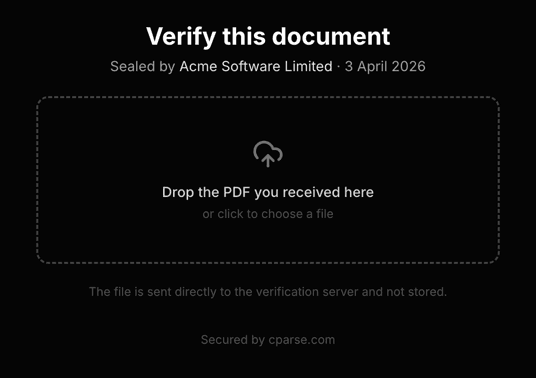
Page load — recipient drops the file they received
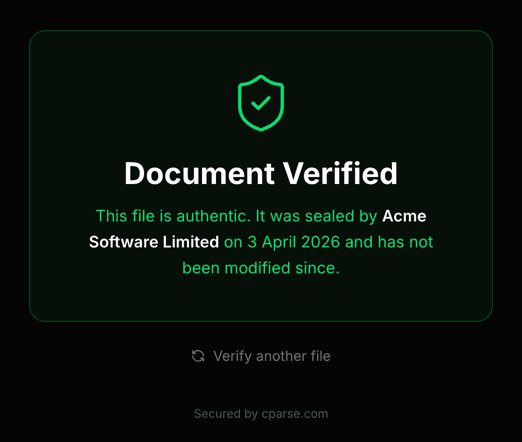
Authentic — hash matches, document is unmodified
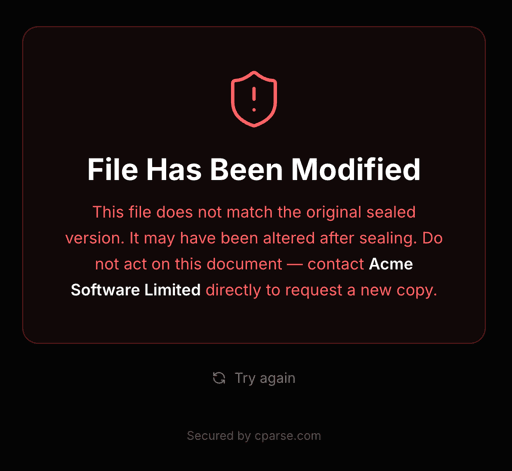
Tampered — hash mismatch, document has been modified
Error Handling
All errors return a JSON body with an error field.
| Status | Meaning |
|---|---|
| 400 | Bad request — missing file, empty body, or invalid tier |
| 401 | Missing or invalid API key |
| 402 | Insufficient balance |
| 404 | Seal ID not found (GET /verify/{seal_id} only) |
| 413 | File too large for your plan |
| 415 | Unsupported file type — only PDF files can be sealed |
| 500 | Internal error during stamping |
Code Examples
Python
Seal and save
import requests

with open("invoice.pdf", "rb") as f:
    response = requests.post(
        "https://api.cparse.com/seal/v1/seal",
        headers={"X-API-Key": "YOUR_API_KEY"},
        files={"file": ("invoice.pdf", f, "application/pdf")},
        data={"tier": "premium", "issuer_name": "Acme Corp"},
    )

response.raise_for_status()
seal_id = response.headers["X-Seal-ID"]

with open("sealed_invoice.pdf", "wb") as out:
    out.write(response.content)

print(f"Sealed. ID: {seal_id}")
Node.js
Seal and verify
import fs from 'fs';
import FormData from 'form-data';
import fetch from 'node-fetch';

const form = new FormData();
form.append('file', fs.createReadStream('invoice.pdf'), 'invoice.pdf');
form.append('tier', 'premium');
form.append('issuer_name', 'Acme Corp');

const sealRes = await fetch('https://api.cparse.com/seal/v1/seal', {
  method: 'POST',
  headers: { 'X-API-Key': 'YOUR_API_KEY', ...form.getHeaders() },
  body: form,
});

const sealId = sealRes.headers.get('x-seal-id');
const sealedPdf = Buffer.from(await sealRes.arrayBuffer());
fs.writeFileSync('sealed_invoice.pdf', sealedPdf);

// Later: verify by upload
const verifyForm = new FormData();
verifyForm.append('file', sealedPdf, 'sealed_invoice.pdf');

const verifyRes = await fetch('https://api.cparse.com/seal/v1/verify', {
  method: 'POST',
  body: verifyForm,
  headers: verifyForm.getHeaders(),
});
const result = await verifyRes.json();
console.log(result.authentic ? '✓ Authentic' : '✗ Tampered');